Built and supported from Rahim Yar Khan, Pakistan.
The operational problem
One business. Too many disconnected tasks.
Billing happens at the counter. Stock moves between locations. Payments arrive later. Owners need answers now. When each part lives in a different place, small gaps turn into daily uncertainty.
Our projects are designed to connect those routines into a clearer operating system—on desktop, mobile or cloud.
01
Slow billing
Manual searches and repeated entry hold up customers and staff.
02
Unclear stock
Multiple locations make quantities and transfers harder to trust.
03
Scattered accounts
Dues, expenses and payments are difficult to read as one picture.
04
Limited visibility
Important information stays at the desk when the owner is away.
Project 01 · Core ERP & POS
BizRocket
The system at the center of daily operations.
BizRocket brings billing, products, customers, suppliers, purchases, stock, expenses and accounts into one working environment. It is made for teams that need speed at the counter and clearer control behind it.
Instead of stitching together separate tools, the business can follow activity from transaction to stock and financial impact.
BizRocket main form
One workspace. Ten focused modules.
The main form keeps each area easy to reach while the underlying records stay connected across the ERP.
01MMastersSet up the core records the rest of the ERP relies on, keeping business data organized and reusable.+
Account
Add New Account
List of Accounts
Change Opening Balance
Importing
Import All Customers
Import All Suppiers
Import Prices for Accounts Groups
Accounts Info
Other charges Head
New Accounting Group
New Route
Area
Link Routes to Area
New Accounts Group
02▦ProductsManage items, pricing, stock information and the product records used across purchases and sales.+
New Item
Add Item
Item List
Add Multiple Barcode
Item Categorization
Item Group
Item Company
Unit Of Measure
Item Sub Category
Item Size
Item Color
Updating
Average Purchase Rate for Items
Iteme Rate Scheme
Item Rate Scheme Import
Update Item
Batch Stock Transfer
Bulk Price Change
Update Batch
Bulk Batch Price Update
Importing
Import Items from Excel
Godown
New Godown
03PProductionKeep production-related records and workflows together when the business handles manufacturing activity.+
Bill of Materials
New Bill of Material
Modify A Process
View All BOM
Start New Process
Add New Process
View All Process
Production
Add Production Voucher
List of All Production
Expense Wise Production
Multi Product Generation
Multi Product Generaion History
Wastage
Add New Wastage
All Wastage
Stock Transfer
New Stock Transfer
Expenses Head For Production
New Expense
View All Expense
04↔TransactionWork with day-to-day sales, purchases, receipts, payments, expenses and other business entries.+
Billing
Purchase Invoice
Sale Invoice
POS
Cash Counter
Bulk Sale Invoices
Quotation / Gate Paas
Create New Service
Create New Token
Date Wise Token Reports
Quotation
Gate Paas
Gate Paas History
Stock In and Out
Stock In
Stock Out
Returns
Purchase Return
Sale Returns
Claim
Stock Adjustment
Purchase and Sales Orders
Sale Challans
Purchase Challans
Sale Order
Purchase Order
Credit Note Sale
Debit Note Sale
Sale Bill Updated or Deleted
Sale Invoice Update History
Deleted Sale Invoice History
Purchase Bill Updated or Deleted
Purchsae Bill Update History
Deleted Purchase Bill History
05₨BankingFollow cash and bank activity through connected accounts and financial transactions.+
Transactions
Payment Out
Payment In / Receipt
Add New Expense
Bulk Receipt
Easy Khata
Bill Wise
Bulk Bill Wise Receipt
Bill Wise Receipt
Bill Wise Payment
Financial Accounting
Debit Note
Credit Note
Contra Note
Opening Balance Voucher
Single Opening Balance Voucher
Journal Voucher
Daily Pay
Import Receipts
Import Receipts
Import Expenses
Reminders Payments / Receipts
Reminders For Payments
Reminders For Receipts
Reminders for Expenses
06▥ReportsTurn operational records into useful sales, stock, account and performance information.+
Account Books
All Ledger
Accounts Books
All Accounts Quick Ledger
Day Book
Unified Summary Report
Balance Sheet
Cash Book
Route Recovery
Pending Bills Route Recovery
Customer Receivable
Customer Receivable List Date Wise
Customer Receivable Format 2
Recovery Report Saleman Wise
Income Statement
Debit Note Recovery Report
Group Account Ledger
Contra Note Registry
Credit Note Registry
Debit Note Registry
Bank Entry Registery
Journal Register
Receipt Register
Payment Register
Daily Expense
Other Charges Head Report
Trading Accounts
Customer Trial Balance
Trail Balance
Outstanding Analysis
Cheque Book Status
Log Book
Area Wise Recovery
Recovery Sheet Saleman Area Wise
All Customer Ledger
All Supplier Ledger
Accounts Receivable
Aging Report
Outstanding Aging Report bill Wise
Outstanding Aging Report Area Wise
Saleman / Broker / Agent wise Aging Report
Agent Wise Sale Bill Aging
Agent Area Wise Sale Report
Agent Wise Sale Bill Aging With Expenses
Audit
Accounts Payable
Aging Report Purchase
Outstanding Aging Report Purchase Bill Wise
Date Wise Commision
Commision Payed Details
Broker Sales
Accounts Bind to Brokers
Broker Item Sale
Agent Commision Date Wise / Item Wise
Saleman Sale Summary
Sale Summary Company Broker Wise
Saleman Wise Sale Report ( Item Wise )
Saleman Tour Summary
Saleman Tour Summary Customer Wise
Saleman Date Wise Loading Summary
Salesman Item Movement
Cash Statement
Sale Registry
Daily Profit Report
Average Profit
Sale Summary : Item Wise
Sale Summary : Customer Wise
Sale Summary : Company Wise
Sale Summary : City Wise
Sale Summary : Area Wise
Sale Summary : Group Wise
Sale Summary : Company Group Wise
Sale Summary : Area Company Wise
Sale Summary : Product Area Wise
Sale Summary : Party Company Wise
Sale Summary : City Area Wise
Sale Summary : Area Route Wise
Sale Summary : Customer Wise
Sale Summary : Company Broker Wise
DSR REPORT
Sale Loading Summary Invoice to Invoice
Sale Loading Summary Company Wise Inv to Inv
Sale Loading Summary (Date Wise)
Sale Loading Summary Co. Wise (Date Wise)
Customer Wise Details
Summar of bills
Sale History Inv Wise
Sale Summary Customer Wise Without Profir
Water Bottle Delivery Report
Sale Summary Customer Group Wise
Sale Summary With Holding tax
Sale Summary Date Wise
Sale Summary Customer Bonus
Return of Bottles
Return of bottles Date Wise
Profit Recovery Wise
Sale Statement
Daily Sale Statement
Sale Return Register
Sale Registry Extanded
Sale Registry Detailed
Pending Sale Order Register
Clear Sale Order Register
Sale Bill With Tax Detail
Sale Return With Tax Details
POS Register
POS Summary
POS Biil Book
User Wise Bill
Date Wise POS Report
Purchase Registry
Purchase Registers Detailed
Purchase Register Extanded
Purchase Return Register
Purchase Challan Register
Purchase Summary : Item Wise
Purchase Summary : Supplier Wise
Purchase Summary : Company Wise
Purchase Summary City Wise
Purchase Summary : Area Wise
Purchase Summary : Group Wise
Group Wise Monthy Purchase
Company Wise Monthly Purchase
Purchase Order List Pending
Cleared Purchase Order History
Purchase Order All
Supplier Report
Purchase Bill With Tax Details
Purchase Return With Tax Details
Stock Report
Stock Report Summary ( 2026 NEW )
Stock Summary
Item Wise Stock
Stock Report Detailed ( 2026 )
Category Wise Stock Reports
Company Wise Stock Report
Available Stock
Available Stock Report Pcs Wise
Batch Wise Stock Report
Low Stock
Daily Stock Report
Sub Item Wise Stock Report
Stock Day Book
Rate List
Dump Stock Report
Stock Required
Expiry Report
Item Location
Godown Wise Stock Transfer
Godown Wise Stock
Item List Print
Container Report
Stock With Tax
Dsr
All Available Serial No
Srial No. Tracking
Available Serial Number
Serial Number Sold
Item WiseSerial Register
IMEI WISE PROFIT
Store Wise Reports
Purchase For Store
Sale From Store
Store Wise Report
07HRHROrganize employee-related information, responsibilities and access within the business system.+
Employe
Add New Employee
Edit Employee Info
View All Employee
Employee Payment Voucher
Generate Salary Slip
Employee Quick Receipt
Add New Designation
Add New Department
Financial Reports
View All Employee With Loan
Employee Wise Transaction History
Punch Attendence
Punch Attendance
View All Attendence
08EMIEMIManage installment-based activity, schedules and dues from a dedicated module.+
Equated Monthly Installment
New Installment
Transfer EMI
Emi Receipt
EMI Cancel
EMI Return
Incoming Installments
All Customer Report
View All Receipts Date Wise
Bulk Emi Receipt
View Installments Party Wise
View Receipts Party Wise
View Receipts With Fine Details
Customer Wise Installment Details
Profit on EMI
Emi Reschedule
Profit Emi WRT Installments
09⇅Mobile SyncControl the data connection between BizRocket and BizMobile, including pending mobile activity.+
Incomming
Un Posted Invoices
Un Posted Receipts
Un Posted Expenses
Un Posted Purchases
Un Posted Payments
Users Access
APP Users
Activate Mobile
Live Location
Customer Locations
Salesman Journey
User Roles Persmissions
History
Posted Sales
Posted Purchase
Posted Expenses
Posted Receipts
Posted Payments
10⚙SettingsConfigure company preferences, users, modules and the rules that shape the working environment.+
Database
Backup Database
Connect Database
Restore Backup
Enable Online Access
Configure Client
User Accounts
Add New User
View All Users
User Role Permission
Communication
Connect Mobile
SMS System
Send Single SMS To Anyone
Send SMS To All Customers
Send SMS To All Supplier
Send SMS To All Employees
SMS Reports
View All Group Wise SMS
Whatsapp Messaging
Send Whatsapp Message To Anyone
Company
View All Companies
New Company
Edit Company
Register Your App
Register Your App Now
Optional Configration
Settings
Bill Footer Template
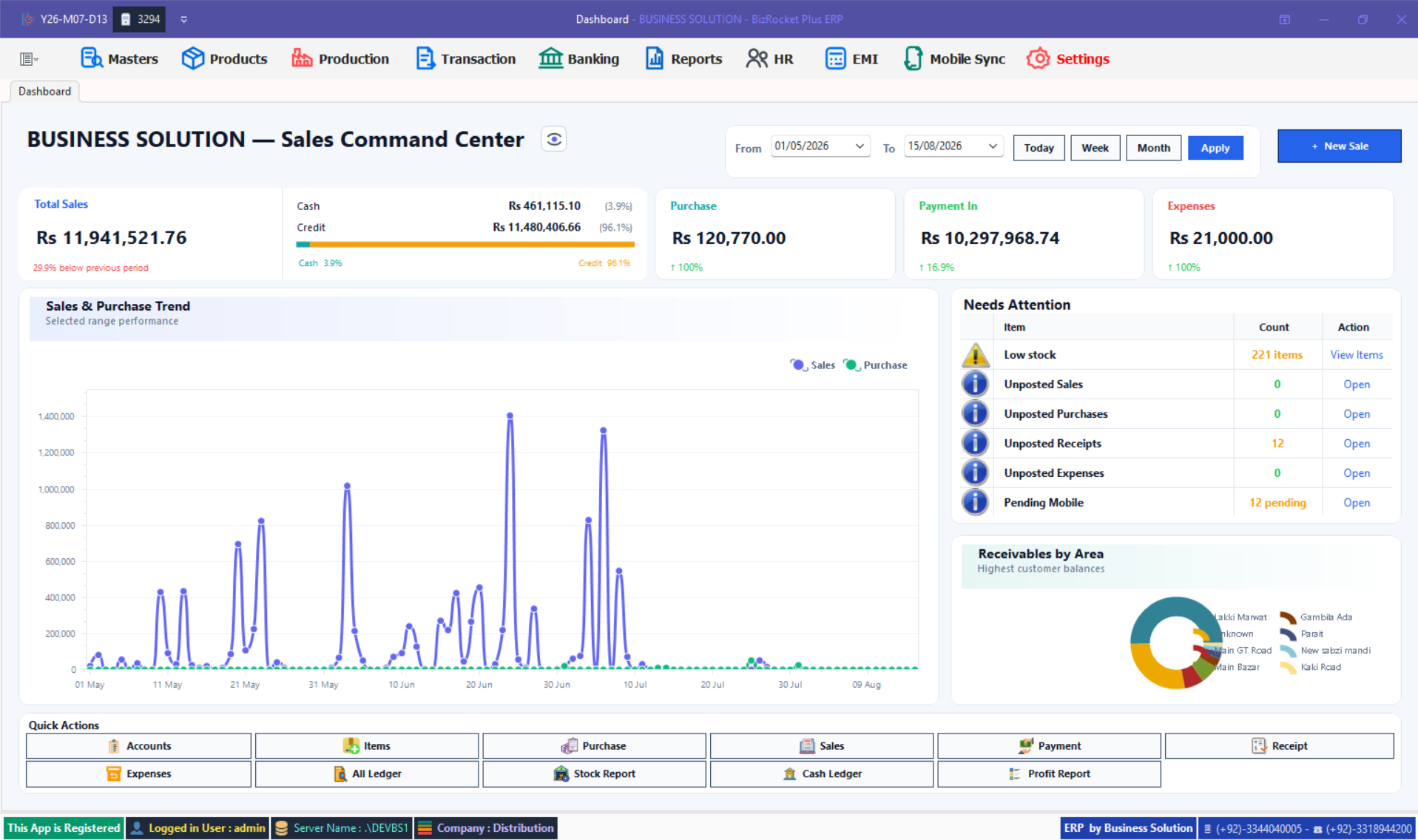
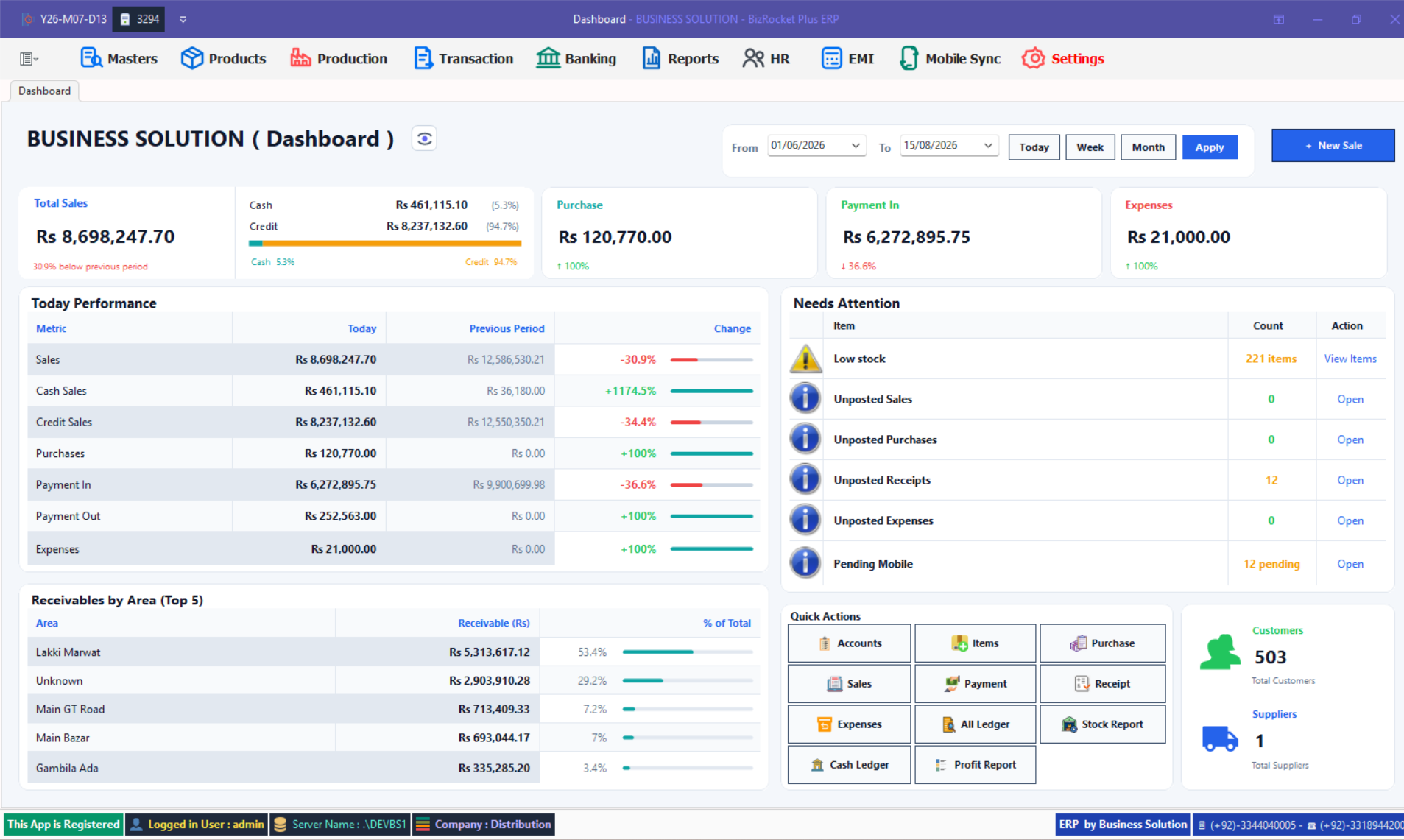
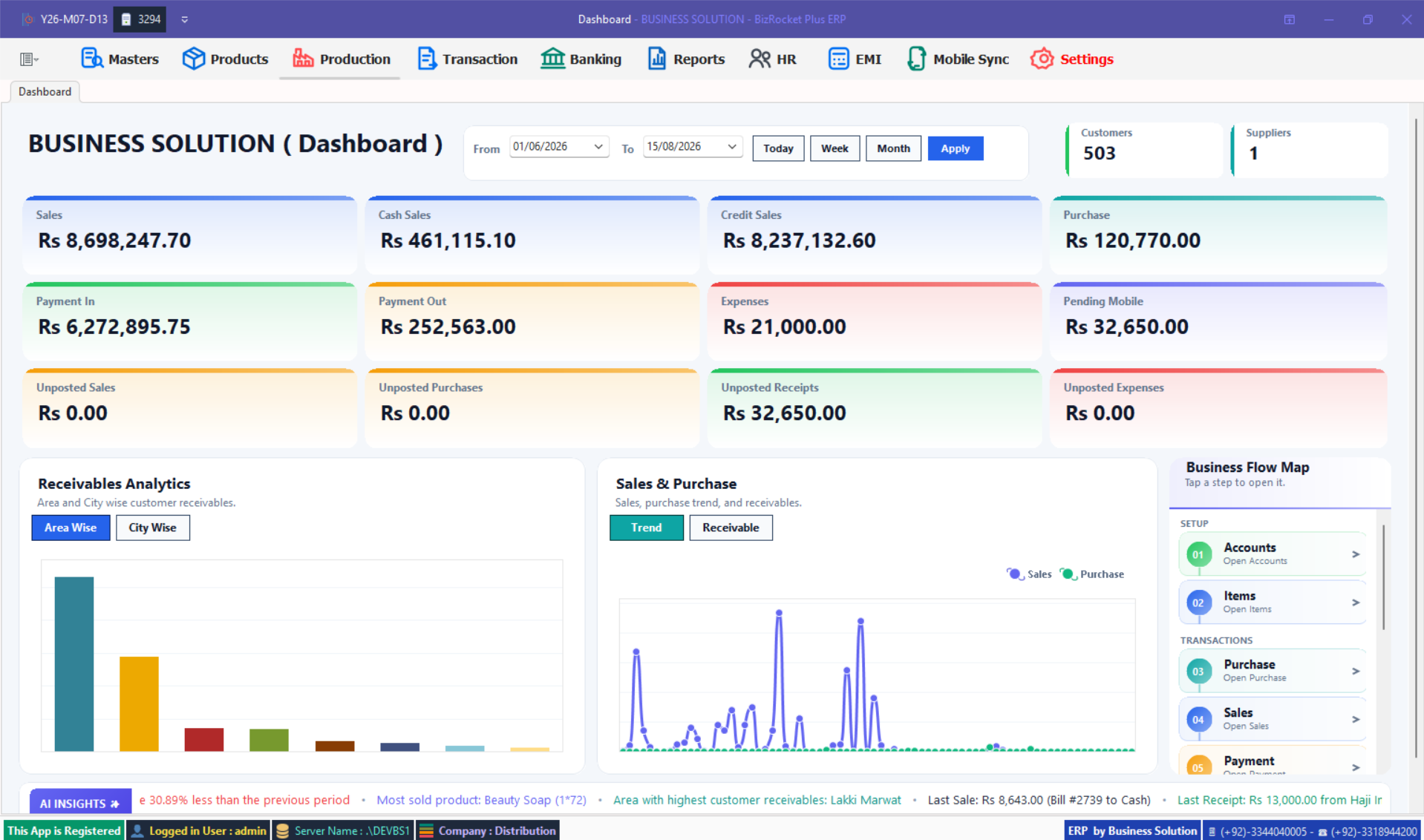
Three dashboard views
See the business from the angle you need.
BizRocket brings sales, purchases, payments, expenses, receivables, stock alerts and quick actions into practical dashboard views.
Sales Command Center
Sales Command CenterTrends, attention items and quick actions
Performance Dashboard
Performance DashboardDaily comparison and receivables
Executive Dashboard
Executive DashboardTotals, analytics and workflow shortcuts
BizRocket in action
Reach ledger and sales history without the searching.
See how BizRocket keeps customer records, delivery information, payments and sales history close to the daily workflow.
Ledger & sales history8-second product view · Play on demand
Your BizRocket information, closer when you leave the desk.
BizMobile is an add-on project that works alongside BizRocket. It syncs selected business information so owners and authorized users can follow live business activity, sales, stock and reporting from a phone.
It extends the BizRocket workflow; it does not replace the main ERP. Available information depends on the connected setup and enabled modules.
Daily sales, inventory and accounts activity starts in the core system.
SYNC→
02COMPANION ACCESS
BizMobile
Synced information becomes available for live tracking and convenient mobile visibility.
Live trackingSynced salesStock statusMobile reports
Live field visibility
Follow field-team movement from one operational view.
Use GPS-backed journey and visit information to understand where field activity happens and how teams cover their assigned market.
Field team movement8-second product view · Play on demand
Project 03 · Cloud ERP
IPOS
IPOS is our separate cloud ERP project for businesses that want connected access across locations and devices. It focuses on managing sales, stock and reporting beyond one local computer.
01
Cloud access
Reach the business system through an internet-connected setup without being tied to one desk.
02
Multi-location view
Bring activity from different business locations into a more connected operating picture.
03
Central reporting
Review important sales and stock information from a shared cloud environment.
04
Flexible growth
Use a cloud-first foundation when the business needs broader access and expansion room.
How we work
A clear path from business need to working system.
1
Understand the operation
We start with how billing, stock, accounts, locations and people work today.
2
Choose the right project
BizRocket, BizMobile and IPOS serve different needs; the setup should follow the business.
3
Configure the workflow
Modules, locations and access are aligned around the tasks the team actually performs.
4
Support daily use
Local support helps the team keep the system useful after the initial setup.
Which direction fits?
Start with the operating model—not the product name.
OFFLINE / CORE
Choose BizRocket
For fast ERP and POS control across billing, inventory, accounts and daily workflows.
BizMobile is a companion syncing add-on for BizRocket. It extends access to selected sales, stock and reporting information on mobile; it does not replace the main BizRocket system.
Is IPOS the same product as BizRocket?+
No. IPOS is presented as a separate cloud ERP project. BizRocket focuses on dependable core operations, while IPOS is designed for businesses that want connected cloud access.
Can BizRocket manage multiple warehouses?+
Yes. Its multi-warehouse workflows support stock visibility and controlled transfers across business locations.
Which product should I choose?+
Choose around how your business operates: BizRocket for core ERP/POS control, BizMobile when that BizRocket setup needs mobile visibility, and IPOS when a cloud-first approach is the better fit.
Start with the real business problem
Tell us what needs to work better.
We’ll help you identify whether BizRocket, BizMobile, IPOS—or a combination—fits the way your business operates.
 Business Solution